
Payments
How payments work on Pandabase.
Pandabase processes payments as the Merchant of Record (MoR): we charge the customer, collect tax, handle disputes, and issue refunds on your behalf. After fees, we settle the net to your store's available balance in USD.
Currency
Customers pay in their local currency wherever supported. This unlocks region-specific payment methods (iDEAL, BLIK, PIX, UPI, etc.) and gives them a familiar checkout. Exchange rates are locked at checkout time and the conversion happens on our side, so you always receive USD.
Final charge amounts may vary slightly due to FX fluctuations between checkout and settlement. Your USD settlement is unaffected.
Payment methods
Global methods (cards, Apple Pay, Google Pay) work in every supported currency. Local methods appear automatically when the checkout is presented in that region's currency.
| Method | Code | Presentment currency |
|---|---|---|
| Card (Visa, Mastercard, Amex, Discover) | card | Any supported |
| Apple Pay | apple_pay | Any supported |
| Google Pay | google_pay | Any supported |
| Alipay | alipay | USD |
| Amazon Pay | amazon_pay | USD, GBP, EUR |
| Bancontact | bancontact | EUR |
| Bizum | bizum | EUR |
| BLIK | blik | PLN |
| Cash App Pay | cash_app | USD, GBP |
| EPS | eps | EUR |
| iDEAL | ideal | EUR |
| Kakao Pay | kakao_pay | KRW |
| MB WAY | mb_way | EUR |
| Multibanco | multibanco | EUR |
| Naver Pay | naver_pay | KRW |
| Pay by Bank | pay_by_bank | GBP |
| PAYCO | payco | KRW |
| PIX | pix | BRL |
| Przelewy24 | p24 | PLN |
| Satispay | satispay | EUR |
| Samsung Pay | samsung_pay | KRW |
| UPI | upi | INR |
| WeChat Pay | wechat_pay | USD |
Lifecycle
Checkout
Customer completes a checkout session and submits payment.
Capture
The payment is authorized and captured. 3-D Secure 2 runs automatically when the issuer requires it.
Fulfillment
On success, an order is created and fulfillment starts (license keys, downloads, webhooks).
Settlement
The net amount (sale minus fees) is added to your available balance, ready to pay out.
Statuses
| Status | Meaning |
|---|---|
| Pending | Awaiting customer or network confirmation. |
| Processing | Payment is being processed. |
| Completed | Payment succeeded, order fulfilled. |
| Failed | Declined or rejected. |
| Cancelled | Cancelled before completion. |
| Refunded | Order was refunded. |
| Chargeback | Customer filed a dispute with their bank. |
Dashboard
The Payments page lists every payment your store has received. Filter by status, search by order or customer, and customize the visible columns.
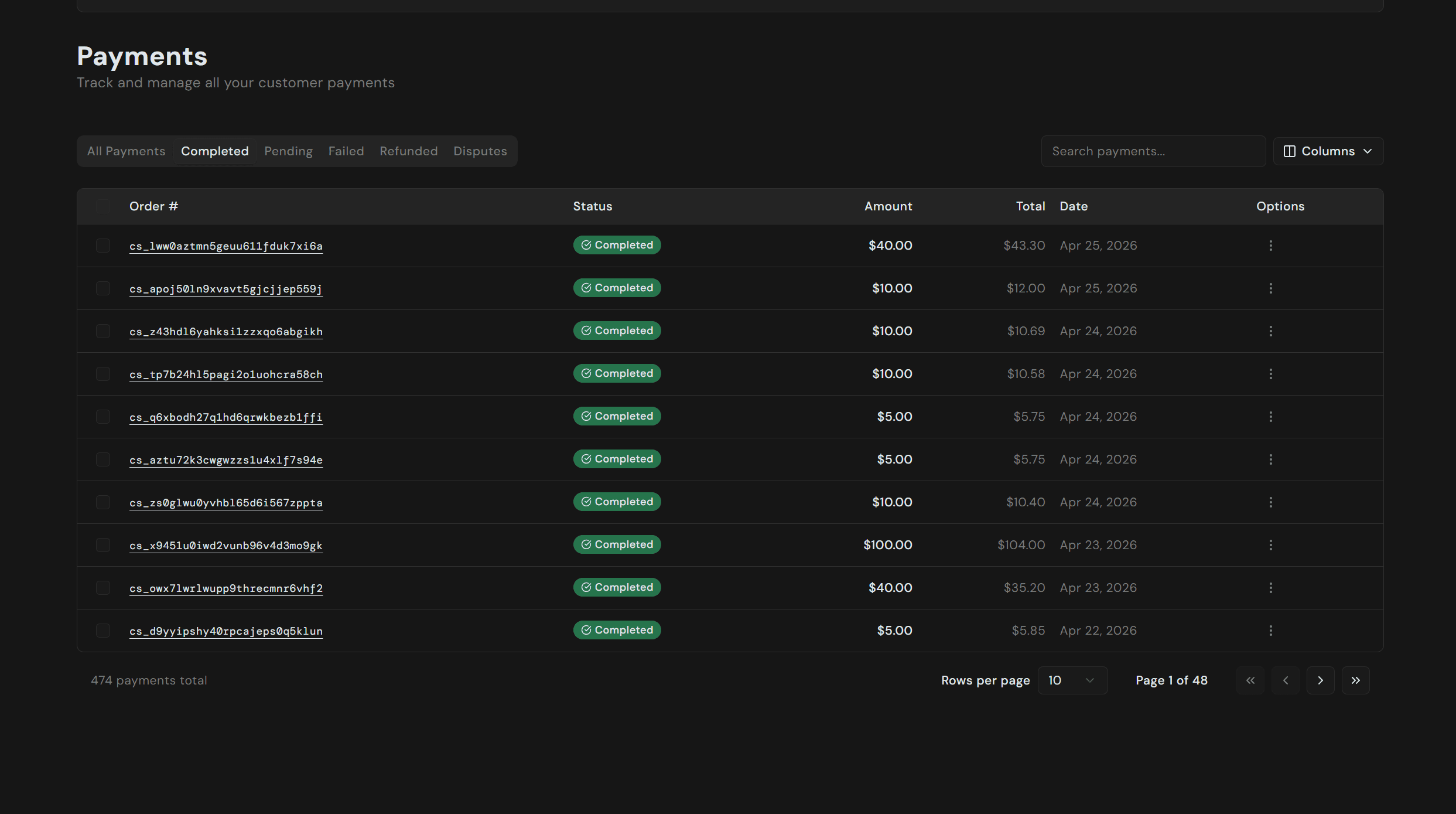
Click any row to open the detail view, which includes:
- Items and totals. Line items, tax, platform fee, processing fee, and the net settled amount.
- Customer. Email and billing address as captured at checkout.
- Location & Network. Country, partial phone, IP, ISP, and browser fingerprint, useful for triaging fraud.
- Internal IDs. Order, customer, payment, and payment reference IDs for support tickets and webhook lookups.
- Timeline. Every event for the payment in order: checkout confirmed, webhooks dispatched, payment captured, order fulfilled.
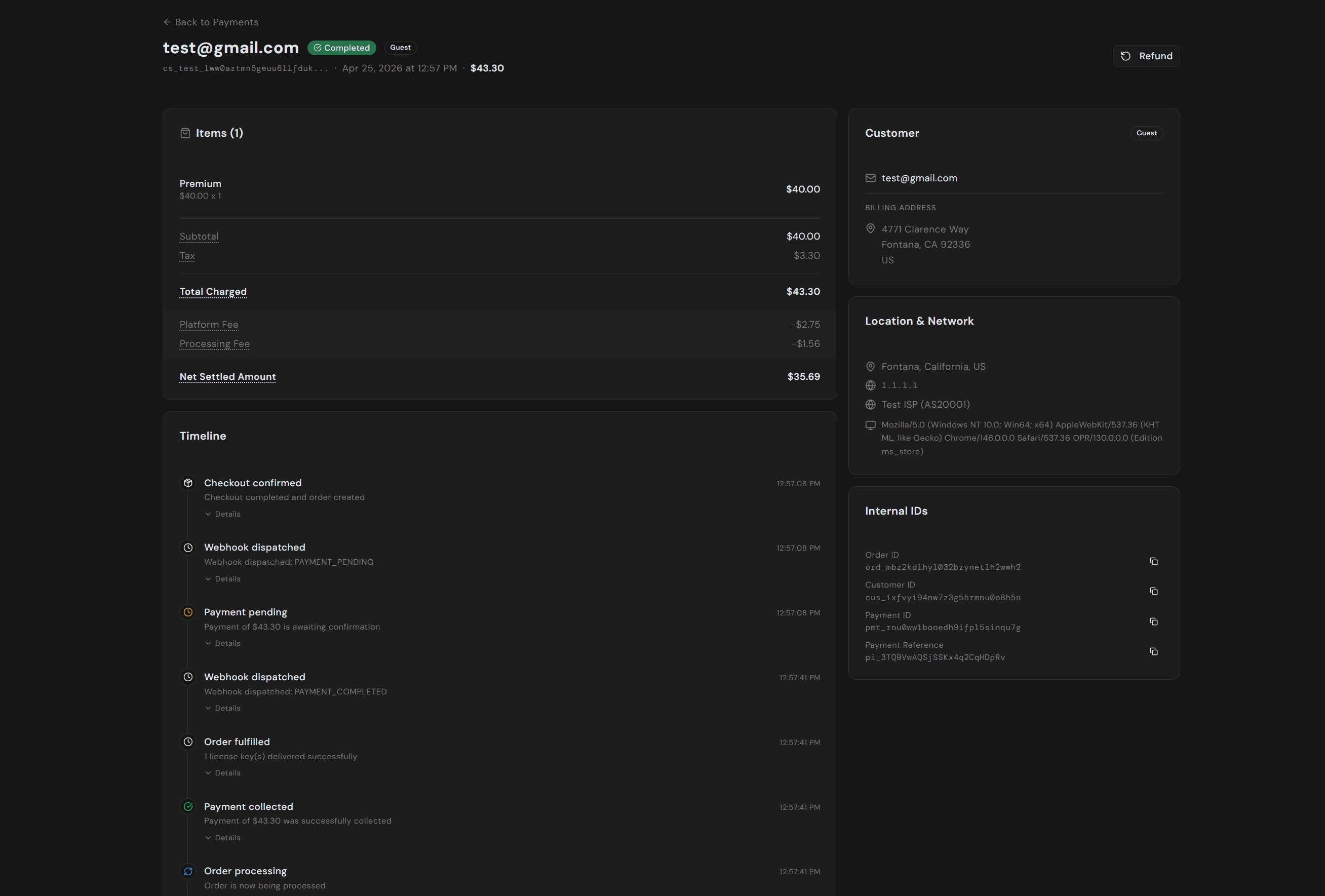
Refunds are issued from the action button in the top right. See Refunds for the full flow.
Fees
You pay per sale, with no monthly or setup fees. See Pricing for the full breakdown with examples.